











Hot Lunch
Hot Lunch Program:
-A fundraising program for initiatives that benefit the whole school
-Lunches 1-2 times a week – usually Monday and Thursday
Grade 6 Fundraising:
-Ordered through the hot lunch program
-Profits go to Grade 6 year-end goal
-Usually once a week – either a lunch option on Wednesday or popcorn on Fridays
IMPORTANT INFORMATION:
* We ONLY accept hot lunch payments through PayPal either as a PayPal guest or with your own PayPal account. (www.paypal.com)
* All orders must be paid for at the time of closing.
*All orders are closed 1 week in advance. Ex: an order for Monday Hot Lunch will close the Monday before at 8:00pm.
*You will not be able to order for the following month’s menu if the current month is not fully paid.
*If you no longer want to order, you must delete the order before the menu closes or you will be responsible to pay for the order, as it will be ordered and delivered to your child.
*If your child will not be at the school for their ordered hot lunch, let the office know if you would like to: Donate, give to a sibling/friend, leave it in the class fridge for the next day, or pick up from the office. You may also email the hot lunch committee and we will contact the office, and let the volunteers know.
*To order, you must register each child you have in HSA prior to ordering hot lunch. You must register again EVERY YEAR.
Here's how to get started...
Go to holyspiritelementary.hotlunches.net


** Try to use a non-Hotmail account. Hotmail will sometimes block our emails from the hot lunch website.
Once you have entered all the required information and entered the access code (Access Code: HSAHL) then click the “Register Now” button at the bottom of the page.
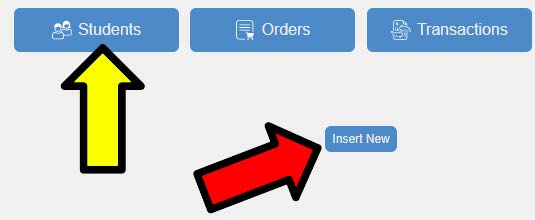
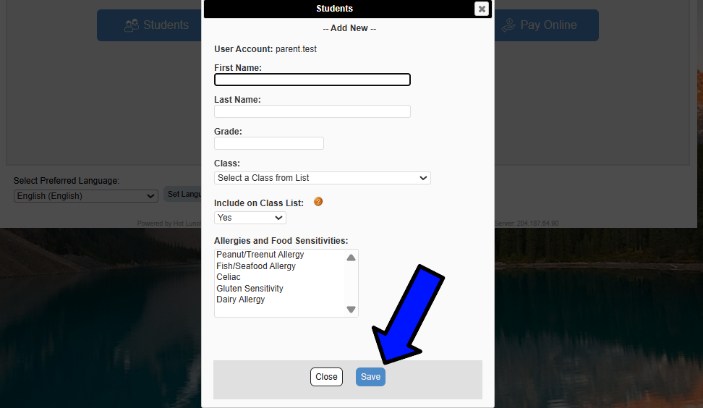
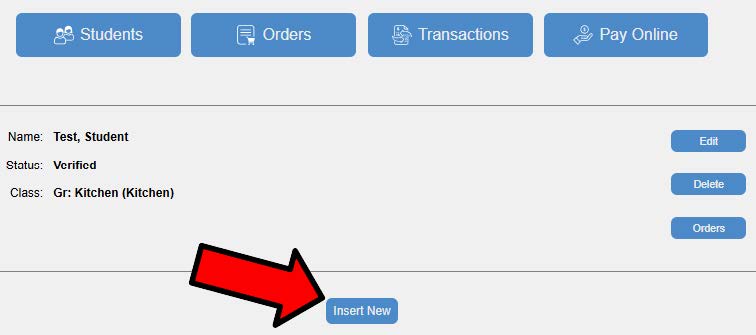
You will now create a profile for each student you want to order for. Select the green STUDENTS menu (YELLOW ARROW), select "Insert New" (Red Arrow) and enter your first student's information and select their appropriate classroom/teacher and once all information is entered press the save button at the bottom (Blue Arrow). For each additional student, click the "Insert New" button (Red Arrow) at the bottom of the STUDENTS page and complete the same steps as above.
HOW TO ORDER HOT LUNCH
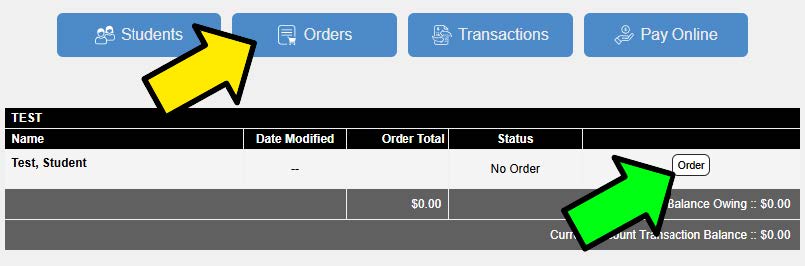
To order from a hot lunch menu, select the blue ORDERS menu (Yellow Arrow) to access the student administration screen. Select the order button next to the student you would like to order for under each menu (Green Arrow).
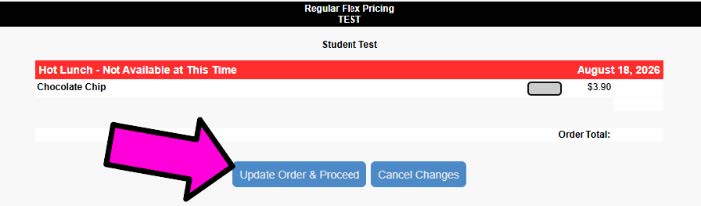
Add any items you would like to order, then at the bottom of the order screen select “Update Order and Proceed” button (Pink Arrow) and it will proceed to the payment screen.
If you want to pay for all your children as one transaction, complete your other children's orders by selecting the order button beside their name (Blue Arrow) before going to the next step. To pay for your order(s) select "Pay with Paypal" button (Red Arrow) then finish with your Paypal payment to complete your order(s).
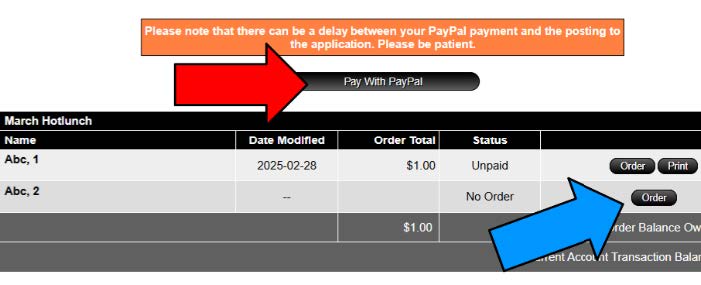
**Please note: Should you experience any issues with your Paypal account, you must contact Paypal directly to resolve the issue.
VOLUNTEERING FOR HOT LUNCH
Hot Lunches are fully run by amazing volunteers! Please consider volunteering your time or asking another family member to help volunteer for 1-2 hours around lunch to help us organize these amazing lunches for the kids. You will never be alone on these days, and if you’ve never done it before, one of our Hot Lunch Committee members will be there to show you everything. You are also more than welcome to bring your younger kids with you for the hot lunch; we always love having little volunteers with us. Volunteers are given a free lunch for their time, which they can keep for themselves or give to one of their kids in the school.
Hot Lunch & Grade 6 Volunteer Sign-up: Volunteersignup.org/9CEK9
If at any point you have any questions related to hot lunch, volunteering or need additional help, please contact the Hot Lunch Committee anytime through our email: hotlunchhsa@gmail.com